Music Tutor (Sight Reading)
- 3.7
- Rating
- 1.00M
- Installs
- Free
- Price

 Analysis by App-foxy
When I tested Music Tutor (Sight Reading), I found a focused practice game that turns reading written music into a quick recognition exercise. It is not trying to replace a teacher, a full instrument-learning course, or a complete theory curriculum. Its value is narrower and more practical: it gives you a way to look at notes, identify them, and build speed through repeated sessions. For someone who already has access to a piano, keyboard, or another instrument, that simple loop can make spare minutes more useful.
I especially noticed its potential in a shared household. One person can use it for a short personal drill, then another can pick it up later without needing the same musical goal. That makes it easier to fit into a family routine than an app built around a long lesson sequence. At the same time, the lack of a clearly separate learning path for each household member means that parents, siblings, or teachers need to coordinate practice themselves. It works best when everyone understands what the game is for and treats it as an individual exercise rather than a shared scoreboard.
How the sight-reading game feels in everyday use
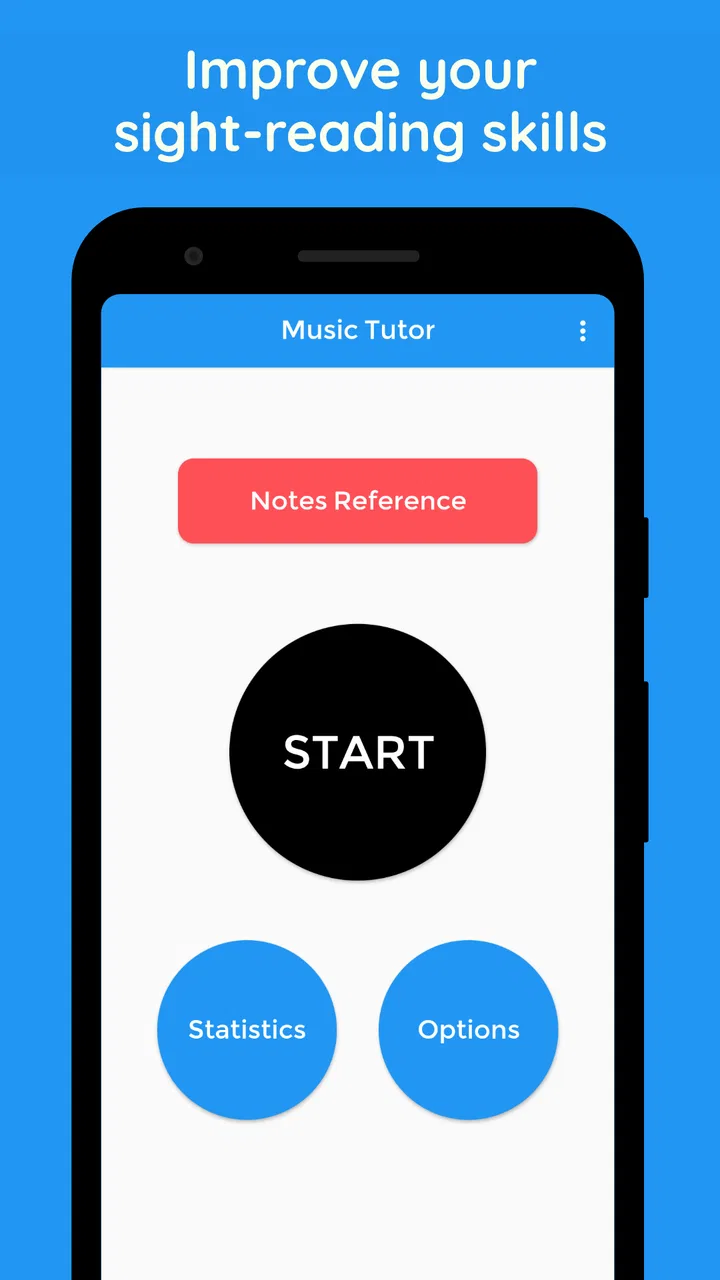
The central activity is straightforward: music appears on the screen and you respond with the note you believe it represents. That sounds basic, but sight-reading is one of those skills that often improves through frequent exposure rather than occasional long study sessions. I found the game most useful when I played for a few minutes at a time, concentrating on immediate recognition instead of stopping to analyze every symbol.
You May Also Like

 Blood Strike: 2.5 Anniversary
Blood Strike’s Loadouts Turn Every Drop Into a Tactical Gamble
A close look at Blood Strike’s custom loadouts: how fast access to signature weapons reshapes its battle royale rhythm, rewards preparation, and narrows the gap between fights.

 Pandora - Music & Podcasts
Pandora’s Music Is Easy to Start, but Harder to Recover
Pandora’s strength is its low-effort path from a seed to a station. Its weak spot is how much confidence it asks you to place in connection, setup, and quiet recovery.

 8 Ball Pool
 Is Built on Rivalries, Rematches, and Routine
A close look at the rivalries, rematches, shared routines, and unanswered safety questions that turn a quick pool match into a persistent mobile community.

 Samsung Music
’s Quiet Strength Is Playing What You Already Own
Its reach comes less from spectacle than from dependable access to a personal library. That simplicity is both the app’s strongest retention engine and its ceiling.

 AccuWeather: Weather Radar
AccuWeather Review: A Quick, Clear Forecast for Everyday Decisions
For everyday plans, the best forecast is the one you can understand quickly. AccuWeather makes rain timing, radar, and local conditions easy to act on, with a few trade-offs.

 Hill Climb Racing
Why Hill Climb Racing Still Turns Crashes Into One More Run
A tiny car, a bumpy hill and one more upgrade: Hill Climb Racing keeps resurfacing because its simple chaos makes every near-miss feel personal.
More From Our News Desk



That distinction matters. Beginners often learn a note by counting lines and spaces from a familiar reference point. This is a necessary first step, but it can become slow if it remains the only method. A practice game such as this encourages the next stage: seeing a note and recognizing its position more directly. I would not expect instant fluency, but regular short drills can help reduce hesitation.
The experience belongs to the music category, although calling it a conventional game may set the wrong expectation. There is no need to approach it like an adventure or an arcade title. The reward is the improvement in response time and confidence. I think of it as a musical flashcard tool with game-like pressure, which is useful for learners who find ordinary written exercises dull.
Music Tutor is made by JSplash Apps and is available free of charge. The free entry point makes it easy to try without committing to a course subscription. Optional in-app purchases cost $1.99 per item, so I would check the purchase prompts carefully on a device used by children. The app is rated for Everyone, but that age label does not mean every child will use it independently; a young learner may still need someone nearby to explain notation and correct misunderstandings.
A realistic shared-device routine
Imagine a household where one child has a weekly keyboard lesson and an older sibling is refreshing basic notation before joining a school ensemble. They can use the same tablet at different times, with each person choosing a small target for the session. The younger learner might focus on identifying notes slowly and accurately, while the older one tries to answer with less hesitation. The app can support both activities because the practice itself is easy to start and stop.
What it does not automatically provide is a household plan. There is no reason to assume that one person’s progress, settings, or results will be separated from another’s. I would therefore avoid treating a shared device as a shared account space for several learners. Instead, each user should keep a simple note of what they practiced, or agree on a routine such as “five minutes before dinner” and discuss progress outside the app.
This small adjustment prevents a common problem: the most confident player can make the activity look successful while the beginner remains unsure. If you are supervising children, ask them to explain how they recognized a note occasionally, rather than judging them only by speed. That turns the game into a learning conversation and helps reveal whether they are reading the staff or guessing from repetition.
What to settle before several people use it
On a personal phone, setup is uncomplicated because the device already belongs to one learner. On a family tablet, I would establish a few boundaries before handing it over. Decide who can make purchases, whether the device is passed around during practice time, and whether each person is expected to use headphones or keep sound off. These are household arrangements rather than special functions of the app, but they make a noticeable difference.
The purchase boundary deserves particular attention. Since optional items are priced individually, a child should not be left to interpret an in-app purchase screen alone. If the app is being used as a free practice tool, make that expectation clear and keep payment approval with the adult responsible for the device. This is especially important when several children use one tablet and may assume that a purchase made by one person is available to everyone.
I would also agree on what counts as a successful session. A fast score is not automatically better practice if the player is guessing. For a beginner, accurate answers at a comfortable pace are a sensible first goal. For a more experienced reader, reducing pauses may be more useful. Sharing the same device does not require sharing the same standard.
Coordinating practice without turning it into pressure
Music practice can become uncomfortable when family members compare results too directly. Music Tutor is better suited to private improvement than to a competition between siblings. If one player already reads notes comfortably, they will naturally have an advantage, and that advantage says little about the beginner’s effort. I would use the app to set personal challenges instead: recognize a note more quickly today, make fewer guesses, or complete a short session without losing concentration.
A useful household method is to pair the app with the instrument. After a note-reading session, the learner can find the same notes on a keyboard or name them while looking at a printed exercise. This creates a bridge between screen recognition and actual playing. The game alone may improve identification, but it cannot replace the physical coordination of locating notes, shaping sound, and keeping a rhythm.
Another practical tip is to practice before a lesson rather than immediately after a difficult one. A short, low-pressure session can refresh note names without adding another large assignment. After a lesson, however, the learner may need targeted explanation from the teacher, particularly if the confusion concerns clefs, rhythm, key signatures, or notation conventions beyond simple note recognition. I would not use repeated game attempts to cover up a concept that has not been taught clearly.
For adults, the app can fit into waiting time or a commute if the device is convenient, although an instrument is not always available. That makes it useful for mental rehearsal. You can work on recognizing notation away from the keyboard and then test whether the improvement transfers when you next play. This separation is helpful because it shows whether the problem is reading the note or finding it physically.
Who will benefit most from it
I would recommend this game to a beginner who has started learning an instrument and needs more exposure to written notes. It also suits returning musicians who remember the general idea of notation but hesitate over individual notes. Students who dislike worksheets may respond well to the immediate question-and-answer format, particularly if they can turn it into a regular habit instead of a one-time download.
It can also serve as a warm-up for music teachers and parents. A learner can spend a few minutes identifying notes before moving to a lesson book, which may make the printed material feel less intimidating. The app is not a substitute for feedback, but it can free the teacher from spending every minute on the most basic recognition drills.
I would be more cautious about recommending it as a first and only music app for a very young child. The Everyone content rating is reassuring from an age-classification perspective, but musical readiness is different from content suitability. A child who cannot yet connect the staff to an instrument may need a more visual, guided introduction. An adult should be ready to explain the symbols and keep sessions encouraging.
It is also not the right choice for someone looking for complete ear training, rhythm practice, composition tools, song tutorials, or a structured course. A broader music-learning platform will be a better fit if you want lessons that move from notation to technique in a planned sequence. This game is strongest when you already know what sight-reading gap you want to work on.
Where it sits beside ordinary alternatives
The usual alternatives are printed flashcards, a teacher’s worksheet, or simply reading music while practicing a song. Each has a different advantage. Paper is flexible and does not depend on a battery, while a teacher can diagnose why a learner is struggling. Practicing from a score gives the skill a musical purpose. Music Tutor adds speed and convenience: it can present repeated recognition prompts without requiring someone else to prepare them.
That convenience comes with a trade-off. A flashcard or score can encourage deeper inspection, while a timed or game-like response may tempt a player to guess. I recommend slowing down whenever accuracy begins to fall. The app is most valuable when it strengthens reliable recognition, not when it turns notation into a reflex detached from musical meaning.
Compared with a large subscription-based learning service, this is a much smaller commitment. You are not entering a broad curriculum with many instruments and lesson categories. That can feel limited, but it also keeps the purpose clear. If your immediate need is “I still take too long to name notes,” a compact tool may be more helpful than a crowded platform full of lessons you do not intend to use.
Its average rating is 3.7 from around three and a half thousand ratings, with over one million installs. I read those figures as signs of a widely tried, useful-but-not-universal tool rather than proof that it will suit every learner. The number of people who have installed it gives it credibility as a practical option, but the middling rating is a good reminder to keep expectations realistic: this is a focused drill, not a complete answer to learning music.
Device age, trust, and account expectations
The current version is 2.32.3 and it requires Android 5.0 or later. That makes it relevant for people using an older Android phone or a hand-me-down family tablet, provided the device meets that system requirement. Before planning a shared routine, I would check the operating system and test the screen size. Note-reading depends on seeing the staff comfortably, so a cramped display can make practice tiring even when the software runs.
The app has been available since January 11, 2016, which gives it a long presence compared with many short-lived practice tools. I would still treat the download as one part of a household’s device decision. Keep the device’s purchase permissions under adult control, explain that the app is for practice rather than unrestricted play, and make sure each learner understands that personal progress may not be automatically separated when a tablet is shared.
For an adult using a private phone, those boundaries are simple. For children, trust works better when expectations are visible: use the app during the agreed time, do not approve purchases, and ask for help when a symbol is confusing. Because the game is educational in purpose, it can be tempting to leave a child alone with it for long periods. I would avoid that. Short supervised sessions are more likely to stay productive and less likely to become guessing contests.
There is also a social boundary worth considering. A parent should not present every result as a test of musical ability. Reading notation develops unevenly, and a child may understand the notes but respond slowly under pressure. Praise careful thinking and improvement rather than comparing one sibling’s performance with another’s. That approach makes the shared device feel like a resource, not another source of rivalry.
Small techniques that make the practice more effective
My first recommendation is to separate recognition from playing. Spend one session simply naming notes, then use the instrument afterward to locate a few of them. This reveals whether the learner has a reading problem, a keyboard geography problem, or both. Treating those as separate skills makes practice more precise.
Second, keep a tiny error log outside the app. Write down the notes that repeatedly cause hesitation and review only those for a minute before the next session. This is more efficient than replaying every note equally. In a household, each learner can maintain a different list, which creates a personal practice boundary without needing separate in-app profiles.
Third, change the goal when accuracy becomes stable. Do not immediately chase speed. Instead, ask the learner to say the note aloud, find it on the instrument, and then play it. That three-step routine adds meaning to the visual prompt and reduces the risk of memorizing a screen pattern. Once the connection feels secure, faster responses become more useful.
Finally, stop while attention is still good. The app is easy to use in short bursts, and I think that is an advantage rather than a limitation. A tired learner can produce a misleading sense of failure, while a brief successful session encourages a return the next day. For families sharing one device, several short turns are also easier to coordinate than one long block.
My household verdict
Music Tutor (Sight Reading) earns a place as a modest, practical practice companion. I like its narrow purpose because it makes the decision easy: if you need more repetition recognizing written notes, it is worth trying; if you want a complete music education, look elsewhere or use it alongside a broader method. The free price removes much of the risk, while the optional $1.99 purchases mean adults should set clear payment boundaries on shared devices.
In my experience, its best role is between formal lessons and real instrument practice. It gives a learner something specific to do during a spare moment, helps a returning musician rebuild confidence, and can fit several people’s routines when the household handles coordination manually. It should not be mistaken for a teacher, a song library, or a full course, and it will not solve every notation problem by repetition alone.
For a family, I would install it only after agreeing who will use the device, when they will practice, and how progress will be discussed. Keep expectations personal, supervise younger learners, and connect the screen exercises to actual music whenever possible. With those boundaries in place, this small game can turn scattered minutes into useful sight-reading work without demanding a major commitment.
The final question is whether that focused trade-off suits you. If your goal is faster, more confident note recognition, I think it does. If your goal is guided lessons, expressive playing, rhythm development, or a complete path from beginner to performer, choose a broader learning option and treat this as one tool among several. For the right learner, its simplicity is the reason to keep it; for everyone else, that same simplicity may feel too limited.
FAQs for Music Tutor (Sight Reading)
01What is Music Tutor (Sight Reading)?
Music Tutor (Sight Reading) is an educational app designed to help users improve their ability to read sheet music. It presents notes on the musical staff and asks you to identify them, turning basic sight-reading practice into short, interactive exercises. It is suitable for beginners, music students, singers, and instrumentalists who want to develop faster and more accurate note recognition.
02How does Music Tutor help improve sight-reading skills?
The app improves sight-reading through repeated note-identification exercises that train your visual recognition and response speed. Instead of relying only on memorizing note names, you practice recognizing notes in different parts of the staff under time pressure. Regular sessions can help reinforce treble and bass clef knowledge, increase confidence, and make reading new music feel more natural over time.
03Is Music Tutor suitable for beginners with no music-reading experience?
Yes, Music Tutor can be useful for beginners, especially those who are learning the basics of musical notation. The exercises provide a simple way to become familiar with staff positions, note names, and clefs. However, the app works best as a practice companion rather than a complete music course, so beginners may still benefit from lessons explaining rhythm, key signatures, intervals, and other essential concepts.
04Which clefs and musical exercises are available in Music Tutor?
Music Tutor primarily focuses on recognizing written notes, with exercises commonly centered on treble and bass clefs. Depending on the version and selected settings, users may be able to adjust the range of notes, choose specific clefs, and practice at different difficulty levels. These options make it easier to begin with a limited note range and gradually challenge yourself as your reading skills improve.
05Is Music Tutor free to download, and does it require an internet connection?
Music Tutor may be available as a free download, although some versions can include advertisements, optional purchases, or additional features that vary by platform and release. Basic practice generally does not require a constant internet connection once the app is installed, which makes it convenient for short sessions while traveling or away from home. Always check the current store listing for pricing, permissions, and supported devices.
Pros
- Covers both treble and bass clefs for broader practice.
- Short sessions make it easy to practice during spare moments.
- Immediate note feedback helps identify mistakes quickly.
- Useful for beginners building confidence with written music.
- Simple interface keeps attention focused on note recognition.
Cons
- Limited appeal for players who already read notes fluently.
- Repetition may feel monotonous during longer practice sessions.
- Some exercises may not reflect real sheet-music reading.
- Requires consistent practice to produce noticeable improvement.
- Touch-based note input can feel less natural than playing an instrument.

Music Tutor (Sight Reading)
Gallery